Copying read or editing mode
With customizations in read- or editing mode you can copy the masks for the other respective mode.
Note
- The edit or read mode of a data record do not always contain the same elements. If you copy content that is not provided in the target form, this content will not be displayed.
- Using this function you always copy the full mask, individual elements cannot be selected.
- The target mask is overwritten. If you have already made changes to settings in the target mask, then these changes will be lost.
Procedure
- Open the target page.
- Click Customize in the toolbar of the App Designer.
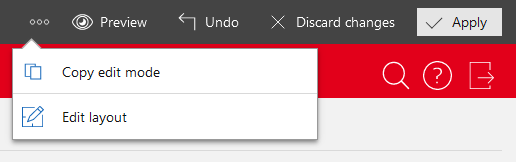
- Open the action menu.
- Select Copy editing mode or Copy read mode. Which of the two buttons is displayed, depends on target page mode.
- Confirm the security prompt if you wish to overwrite all the content on the target page.

